
Show the math
percent change = (new − old) / |old| × 100100 − 80 = 2020 / 80 = 0.250.25 × 100 = 25%25%Positive is an increase, negative is a decrease. |old| keeps that true when old is negative: -10 to -6 is +40%, an increase.100 / 80 = 1.25The percent is rounded to 3 significant figures (auto). Change this in the Significant figures box. The absolute change is not rounded.Short answer: Percent change = (new − old) / |old| × 100. From 80 to 100 the value changes by +20, which is 25% of 80, so the result is a 25% increase. A positive result is a percent increase and a negative result is a percent decrease.
Percent change measures how far a value moved compared with where it started. The starting value is the base, which is why the same gap gives different percentages in each direction. This page covers the formula, how to calculate a percentage increase and a percent decrease, worked examples with real data, working backward from a percent change, percentage points, an old value of 0 and negative numbers.
How to use the percent change calculator
Percent change formula
The percent change formula subtracts the old value from the new value, divides by the old value and multiplies by 100. The old value is the base because the question is how much a quantity moved from its starting point (OpenStax).
The bars around old are an absolute value. They keep the sign meaningful when the old value is negative: positive always means the value went up and negative always means it went down. Wikipedia gives the same formula as relative change. The multiplier route is how the BLS reports index changes (BLS): a multiplier of 1.25 is a 25% increase.
How to calculate percent change step by step
The answer is +25% for 80 to 100 and −20% for the trip back from 100 to 80. Same gap of 20, different base.
How to calculate percent increase
A percent increase happens when the new value is larger than the old one. Subtract the old value from the new value, divide by the old value and multiply by 100. For a bean seedling that grows from 50 mm to 65 mm, the gain is 15 mm, and 15 / 50 × 100 is a 30% increase.
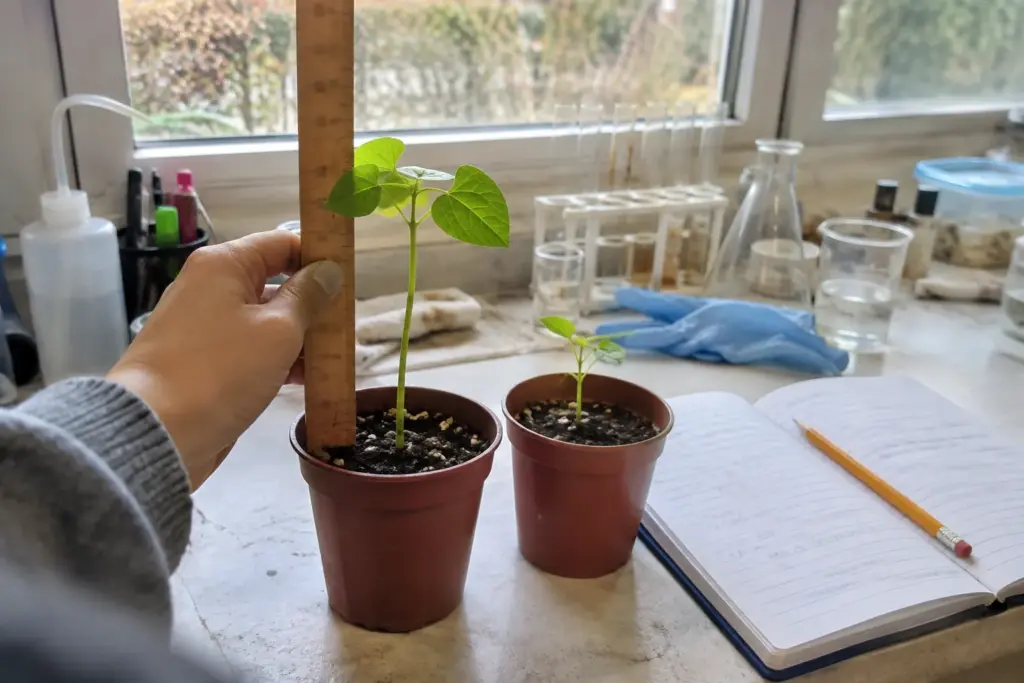
A percent increase has no upper limit. A 100% increase doubles the value, and anything above that more than doubles it. The multiplier shows this directly.
| Old | New | Change | Percent increase | Multiplier |
|---|---|---|---|---|
| 80 | 100 | +20 | +25% | ×1.25 |
| 50 | 65 | +15 | +30% | ×1.3 |
| 100 | 200 | +100 | +100% | ×2 |
| 10 | 35 | +25 | +250% | ×3.5 |
The last row is the case that surprises people. 10 to 35 is a 250% increase because the new value is 3.5 times the old one and only the part above 1 times counts as the increase. The calculator above works as a percentage increase calculator: it returns these figures and labels each one.
How to calculate percent decrease
A percent decrease happens when the new value is smaller than the old one. The formula is unchanged, and the result is negative. From 100 to 80 the change is −20, and 20 / 100 × 100 gives a 20% decrease. Write it as a decrease of that size or as the signed number, −20%, but not both.
| Old | New | Change | Percent decrease | Multiplier |
|---|---|---|---|---|
| 100 | 80 | −20 | −20% | ×0.8 |
| 65 | 50 | −15 | −23.1% | ×0.769231 |
| 75 | 37.5 | −37.5 | −50% | ×0.5 |
| 50 | 0 | −50 | −100% | ×0 |
A percent decrease cannot pass 100% when the old value is positive. Falling to 0 is a 100% decrease, and nothing positive can fall further. The same seedling that grew 50 mm to 65 mm would shrink 23.1% going back from 65 mm to 50 mm, not 30%. The percent decrease calculator is the same tool: enter the larger value as old and the smaller one as new.
Percent change examples with real data
Official statistics use this formula. The 2020 Census counted 331,449,281 residents on April 1, 2020, against 308,745,538 in 2010 (Census Bureau, April 2021). The change is +22,703,743 people, a 7.35% increase. The Bureau prints 7.4% because it rounds to one decimal.

| Example | Old | New | Percent change | Source |
|---|---|---|---|---|
| US resident population, 2010 to 2020 Census | 308,745,538 | 331,449,281 | +7.35% | Census Bureau |
| Mauna Loa annual mean CO₂, 2000 to 2020 (ppm) | 369.71 | 414.21 | +12.04% | NOAA GML |
| CPI-U, December 2021 to December 2022 (index points) | 278.802 | 296.797 | +6.45% | BLS |
Mauna Loa carbon dioxide rose from 369.71 ppm in 2000 to 414.21 ppm in 2020, an increase of 44.5 ppm or 12.04% (NOAA annual means, file read November 2026). The Consumer Price Index measures price change as index points. Moving from 278.802 in December 2021 to 296.797 in December 2022 is a 6.45% increase, which BLS prints as 6.5%. Each table row loads in the calculator through its example button.
Find the new value or the original value from a percent change
Percent change also runs backward. To find the new value, multiply the old value by 1 plus the percent change as a decimal. A 25% increase from 80 is 100: 80 × 1.25 = 100. A decrease works the same way with a negative percent. A 20% decrease from 50 is 40, because 50 × 0.8 = 40.
To find the original value, divide the final value by the multiplier. 100 after a 25% increase means the original was 80, because 100 / 1.25 = 80. After a 25% decrease, 60 came from 80.
| Question | Formula | Example |
|---|---|---|
| Find the new value | old × (1 + percent / 100) | A 25% increase from 80 is 100 |
| Find the new value after a decrease | old × (1 − percent / 100) | A 20% decrease from 50 is 40 |
| Find the original value | new / (1 + percent / 100) | 100 after a 25% increase means the original was 80 |
| Find the original value after a decrease | new / (1 − percent / 100) | 60 after a 25% decrease means the original was 80 |
The common mistake is to take the percent off the final value. Taking 25% off 100 gives 75, but 75 to 100 is a 33.3% increase. The percent always applies to the original, which is the unknown. After a 100% decrease the result is 0, so the original value cannot be recovered from it.
Why a 25% increase is undone by a 20% decrease
A percent change is measured from its own starting value, so the reverse trip starts from a different number. 80 up 25% is 100. Getting back needs 20 off 100, which is 20%, not 25%. The calculator shows this as the change that undoes the result.
| Change | Percent that undoes it |
|---|---|
| +10% | −9.09% |
| +25% | −20% |
| +50% | −33.3% |
| +100% | −50% |
| +300% | −75% |
| −20% | +25% |
| −25% | +33.3% |
| −50% | +100% |
The rule is undo = −p / (1 + p / 100) for a change of p percent. Increases and decreases of the same size never cancel. Chained changes show it in one line. 50 up 50% is 75. Then 75 down 50% is 37.5, a net 25% decrease from the start (50 to 37.5). Percent changes in a row multiply their multipliers; they do not add.
Percentage points vs percent change
When the two values are themselves percentages, there are two valid answers. The gap between them is in percentage points and the relative change is a percent. From 4% to 5% is a change of 1 percentage point, which is a 25% relative increase. The BLS annual average unemployment rate went from 3.6% in 2023 to 4.0% in 2024, a rise of 0.4 percentage points and an 11.1% relative increase (BLS).
| From | To | Percentage points | Percent change |
|---|---|---|---|
| 4% | 5% | +1 | +25% |
| 3.6% | 4.0% | +0.4 | +11.1% |
Use points for the plain gap and percent for the size of the move compared with the start. Tick the percentage box in the calculator to see both together.
Percent change when the old value is 0 or negative
Percent change is undefined when the old value is 0, because the formula divides by it. From 0 to 5 the absolute change is +5, and that is the honest answer. The calculator shows a message and the absolute change instead of an error or an infinite number.
A negative old value needs a sign rule. Dividing by the absolute value keeps positive meaning up and negative meaning down. Dividing by the plain old value flips the sign, and CFI notes that no single formula is accepted for negative bases. Excel Campus argues that the absolute-value result is misleading when a value crosses zero. The calculator uses |old| and says so in its working.
| From | To | Percent change | Reading |
|---|---|---|---|
| −10 | −6 | +40% | Increase: the value rose by 4 |
| −10 | −25 | −150% | Decrease: the value fell by 15 |
| −2 | 4 | +300% | Increase: the value crossed zero |
| −10 | 50 | +600% | Increase: the value crossed zero |
When a negative value crosses zero, the percentage is large and hard to interpret, so report the absolute change alongside it. In reverse mode, a negative base moves by its size: a 20% increase from −10 is −8.
Percent change vs percent difference vs percent error
Percent change has a starting value and a direction. If neither value is the start, use the percent difference calculator, which divides by the average of the two values and gives the same answer in either order. If one value is accepted as correct, as in a lab measurement, use the percent error calculator, which divides by the accepted value. The side-by-side table is on the percent error page.
Significant figures in a percent change
The calculator rounds to 3 significant figures by default. BLS and the Census Bureau print one decimal, which matches 2 significant figures here: 7.35% becomes 7.4% and 6.45% becomes 6.5%. Round only the final answer and keep full digits in the steps.
| Significant figures | 65 to 50 |
|---|---|
| 1 | −20% |
| 2 | −23% |
| 3 (calculator default) | −23.1% |
| 4 | −23.08% |
To count the digits in your inputs, use the significant figures calculator. To round to a fixed number of decimals, use the rounding calculator.
Sources
- BLS. Calculating Percent Changes (CPI)
- BLS. Understanding Index Numbers and Percent Changes (ECI)
- U.S. Census Bureau. 2020 Census Apportionment Results, April 2021
- NOAA Global Monitoring Laboratory. Mauna Loa annual mean carbon dioxide
- BLS. The Employment Situation, unemployment rate table
- Wikipedia. Relative change
- OpenStax. Prealgebra 2e, Solve General Applications of Percent
- Corporate Finance Institute. Calculate Percentage in Excel
- Excel Campus. Percentage Change Formula with Negative Numbers
Frequently asked questions
Subtract the old value from the new value, divide by the old value and multiply by 100. From 80 to 100 the result is 25%.
Percent change = (new – old) / |old| x 100. A positive result is an increase and a negative result is a decrease.
Use the same formula when the new value is larger than the old one. From 50 to 65 is a 30% increase.
Subtract the new value from the old value, divide by the old value and multiply by 100. From 100 to 80 is a 20% decrease.
Yes. A 100% increase takes 100 to 200, a multiplier of 2.
Percent change is undefined because the formula divides by the old value. Report the absolute change instead.
Divide the final value by 1 plus the percent as a decimal. 100 after a 25% increase came from 80.
Percentage points are the plain gap between two percentages, and percent change is that gap compared with the start. From 4% to 5% is 1 point and a 25% increase.